


Turning a favorite clip into a moving phone background sounds like a small customization task, but it quickly becomes a question of convenience, battery, storage, and how much control you want over the final result. I spent time with Video (.GIF;.MP4) to Wallpaper, a free personalization app from Audrius Koncius, and found that its appeal is very direct: it focuses on converting or generating a video wallpaper rather than surrounding that job with a large theme marketplace.
The app supports GIF, MP4, and MOV video files, which gives it a useful range for personal clips, short animations, and videos already saved on a phone. It is available for everyone, works with Android seven and later, and its current version is 1.1.12. The basic download costs nothing, while optional in-app purchases are listed at $0.99 per item. That makes it easy to try without committing money first.
My main impression is that this is a practical tool for people who already have the right video and want to put it to work quickly. It is less convincing for anyone expecting a complete wallpaper platform with a large catalog, elaborate editing controls, or a social discovery experience. The difference matters because the app’s success depends heavily on your own files and on how smoothly your phone handles moving backgrounds.
What the app actually does well
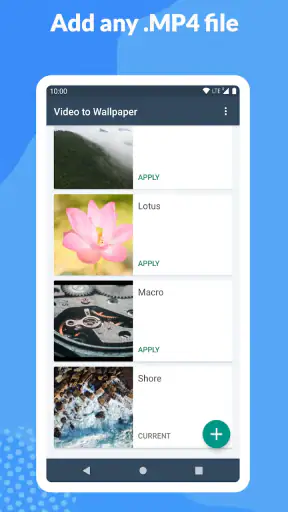
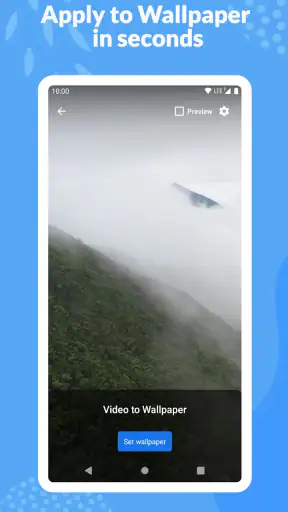
The central workflow is easy to understand. You choose a compatible video, use it as the source for a live wallpaper, and then apply the result through Android’s wallpaper selection process. That direct approach is its strongest quality. I did not feel that I had to learn a complicated creative editor before reaching the useful part.
GIF support is especially handy for short looping animations that were never intended to be ordinary videos. MP4 is more practical for clips recorded with a phone, while MOV can be useful when a video has come from another device or editing workflow. Having these formats together means I could think about the visual result first instead of converting every file before trying it.
Still, format compatibility should not be confused with unlimited flexibility. A file can technically be supported and still be a poor wallpaper source. A wide landscape clip may crop awkwardly on a tall phone. A video with important details near the edges can lose those details when the wallpaper is framed for the screen. I recommend checking the clip in portrait orientation before choosing it, especially if the subject is a person, pet, or piece of text.
The app belongs to the personalization category, but it takes a narrower route than theme stores. Instead of asking me to browse through dozens of premade designs, it treats my own media library as the starting point. That is a real advantage if you want a private memory, a favorite animation, or a deliberately simple visual style. It is less useful if you want fresh wallpaper ideas without preparing anything yourself.
Why the source video matters more than expected
A moving wallpaper is viewed repeatedly, often in short glimpses when unlocking the phone. That changes what makes a good source clip. A dramatic video may look impressive once but become distracting when it loops throughout the day. I found that short, visually calm clips work better than footage with constant camera movement or rapid flashes.
A useful trick is to choose a section that still looks complete when it restarts. If the first and last frames are visually unrelated, the loop can feel abrupt. The app’s value is therefore partly determined before it is opened: selecting a clip with a clean rhythm can make the result seem more polished than selecting a technically sharper but badly timed video.
Another practical consideration is readability. A busy background can compete with icons, widgets, and notification text. I prefer clips with a darker or quieter area behind the main icons, even if the video itself is colorful. This is one of the places where a normal static wallpaper can be better: it gives the interface a stable visual base and usually makes text easier to scan.
Using it while connected and away from a network
The most important connectivity point is that the app works from video files rather than presenting itself as a streaming wallpaper service. In everyday use, the relevant network moment is usually obtaining the source clip. If the video is already stored on the phone, the creative decision is local to the device. If it is in cloud storage, a messaging conversation, or an online service, I would first make sure the file is available before starting the wallpaper setup.
This distinction makes the app feel different from wallpaper catalogs. A catalog depends on browsing and downloading someone else’s content. Here, the network may matter during file retrieval, but the experience is centered on preparing personal media. I would not choose it because I want a constantly changing online feed; I would choose it because I already know which video I want to use.
That also affects travel and low-connectivity situations. The sensible preparation is to select and save the desired GIF, MP4, or MOV before leaving reliable internet access. Once the file is present, the main task is no longer about discovering content online. I would still avoid assuming that every part of the Android wallpaper process behaves identically on every phone, because manufacturers can place their own steps around live wallpaper selection.
For users with limited data, this workflow can be more manageable than repeatedly downloading high-resolution wallpaper packs. The app itself does not turn a large video into a small one simply because it is being used as a wallpaper, so the original file size remains relevant. A short, sensibly compressed clip is usually a better choice than a long camera recording, both for storage and for the time needed to handle it.
How it fits into real mobile situations
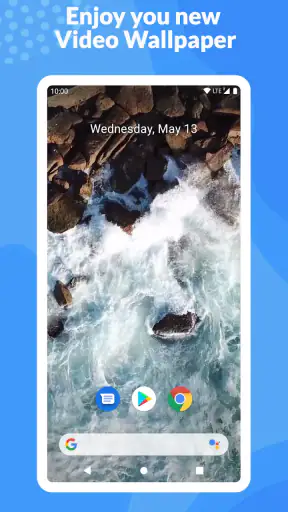
I can see this app working well for someone who wants a personal lock-screen atmosphere without changing the entire phone theme. Imagine recording a short clip of waves, a city train passing at night, or a pet looking toward the camera. Instead of using the recording only inside the gallery, you can turn that moment into a recurring visual detail whenever you check the phone.
It is also useful for small creative projects. A designer could preview a motion background on a personal device, while a fan might use a self-made animation rather than relying on a public wallpaper collection. Someone who changes phones often may appreciate having a repeatable process based on files they control, although they should keep the original clips organized so they are easy to find again.
On the other hand, I would be cautious about using a highly active video on a work phone. Movement can pull attention away from messages and calendar information, and a bright clip may feel tiring after repeated exposure. In that context, a subtle animation or a static background could be the better choice. Personalization is not automatically improvement; the right result depends on how often you look at the screen and what else needs your attention.
Screen size also changes the result. A clip that looks balanced on one phone may appear zoomed or shifted on another. Before treating a video as a permanent wallpaper, I would test it with the actual icons and widgets visible. This catches problems that are easy to miss when viewing the source file in a normal video player.
Where friction appears during setup
The app’s focused design is convenient, but it also means the surrounding Android experience matters. Applying a live wallpaper can involve a system preview or confirmation screen, and the exact wording or placement may vary by device manufacturer. If the app seems to have completed its job but the background has not changed, I would check the phone’s wallpaper picker rather than immediately blaming the video.
Recovery is usually a matter of narrowing down the source of the problem. First, I would try a short file in a common format such as MP4. If that works, the original issue may be related to the specific GIF, MOV file, its encoding, or its dimensions. If a simple file also fails, I would restart the selection process and inspect the system’s live wallpaper settings.
This trial approach is more useful than repeatedly choosing the same problematic clip. It separates file issues from device issues. I also recommend keeping a copy of the original media before experimenting, particularly if the clip has been edited elsewhere. The wallpaper workflow should not replace the source file in your personal archive.
There is another kind of failure that is easy to overlook: a wallpaper can apply successfully and still feel wrong. If it crops the subject, loops awkwardly, drains attention, or makes icons hard to read, the solution is not necessarily reinstalling the app. Try a different clip, a calmer section, or a source with more empty space around its subject. Good troubleshooting here is partly visual judgment.
Battery, storage, and data-conscious choices
Moving imagery naturally asks more from a phone than a still picture, although the actual effect will depend on the device, the video, and the system’s handling of live wallpapers. I would not make a blanket promise about battery life. Instead, I would begin with a short, moderate-resolution clip and observe the phone during normal use. If battery life is especially important, a static wallpaper remains the safer alternative.
Storage is easier to reason about. Large source videos take more room, and keeping several versions can quietly build up. Before importing a long recording, I would trim it elsewhere to the most useful moment. This has three benefits: the wallpaper becomes less repetitive, the file is easier to manage, and there is less unnecessary media on the phone.
Data use is mostly a preparation issue when the source is downloaded or transferred. I would avoid selecting a cloud-only file while on mobile data if the clip is large. Saving a suitable version over Wi-Fi first makes the process more predictable. For GIFs, I would also remember that a small-looking animation can still contain many frames or a large canvas, so visual simplicity does not always mean a tiny file.
One subtle trade-off is quality versus comfort. A very sharp video may look excellent in the preview but be excessive for a background viewed for only a few seconds at a time. A slightly lighter file can be the more sensible everyday choice, particularly on a phone with limited storage. The goal is not to preserve every detail of the original recording; it is to create a background that remains pleasant and unobtrusive.
How it compares with ordinary alternatives
The usual alternative is a static wallpaper from the phone’s built-in collection or a personalization app that offers ready-made images. Those options win on speed and predictability. They normally require less preparation, do not depend on choosing a good video loop, and make it easier to keep the interface visually stable.
Video (.GIF;.MP4) to Wallpaper wins when personalization matters more than convenience. A personal clip can feel more meaningful than a generic image, and support for several common video formats reduces the need to rebuild a file from scratch. The trade-off is that the user has to do more of the creative work: finding the source, judging its framing, and deciding whether motion is appropriate for daily use.
It also differs from a full video editor. I would not approach it expecting detailed trimming, color grading, captions, or cinematic controls. If your goal is to produce a carefully edited wallpaper with exact timing and composition, a separate editor may be the better first step. This app makes more sense after the video is already close to what you want.
Compared with online wallpaper services, its personal-media focus is both its strength and its limitation. You get a result tied to your own files rather than a public catalog, but you also need to bring the ideas and content yourself. That makes it a good companion for people who collect or create media, not necessarily the best starting point for someone who has no wallpaper material in mind.
Who should install it, and who should skip it
I would recommend it to Android users who want to turn a favorite GIF, MP4, or MOV into a moving background without committing to a paid personalization suite. It is particularly appealing if you already have short clips saved on your phone and enjoy adjusting the look of your device around personal moments.
The audience size suggests that this focused approach has broad appeal: the app has passed one million installs, carries a 4.4 average from around thirteen thousand ratings, and has 819 reviews. Those figures do not remove the need to test it on your own phone, but they do indicate that it is not an obscure experiment with no established user base.
I would skip it if you strongly prefer static images, need a large selection of ready-to-use designs, or are very sensitive to battery and distraction. I would also look elsewhere if your main purpose is advanced video editing rather than wallpaper conversion. The app is at its best when the source clip is already chosen and the desired outcome is simple.
The age rating of Everyone makes it approachable for a wide range of users. Even so, the most important suitability question is not age but tolerance for motion and setup. A child may enjoy a playful animation, while a professional who checks a phone constantly may find the same movement irritating. The right choice is personal and should be judged in the context of daily screen time.
My final connectivity verdict
Video (.GIF;.MP4) to Wallpaper is a focused personalization app that rewards preparation. Its connection to the internet is most relevant when you obtain or transfer the source video, not because the core idea depends on browsing a live online catalog. That makes it a sensible option for turning media you already keep into a more personal phone background.
I like the fact that the app does not force a large theme ecosystem on me. I can begin with a clip I already understand, test whether its framing works, and decide whether the movement suits my routine. The practical limitations are equally clear: source quality matters, device behavior can vary, and a moving wallpaper is not automatically better than a still one.
Developed by Audrius Koncius, the app remains free to start, with optional purchases priced at $0.99 per item. For me, that low-risk entry point fits the tool’s purpose. I would install it when I have a specific video in mind, prepare that file before relying on a weak connection, and judge the result after using the phone normally rather than trusting only the preview.
My recommendation is favorable, with one condition: choose the video as carefully as you choose the app. If you want a personal moving background and are willing to manage the clip, this is a straightforward solution. If you want instant discovery, maximum editing control, or the least possible impact on everyday phone use, a static wallpaper or a broader personalization alternative will probably serve you better.


